
Receipts — Attach Files to Transactions
Overview
Section titled “Overview”Receipt attachments let you store digital copies of receipts, invoices, and other documents alongside your transactions. This is a Pro feature.
Supported File Types
Section titled “Supported File Types”- Images — .jpg, .jpeg, .png, .gif, .webp, .heic
- Documents — .pdf, .docx, .xlsx
Maximum file size: 10 MB per file. You can attach multiple files to a single transaction.
Attaching a Receipt
Section titled “Attaching a Receipt”- Open a transaction on the Transactions page
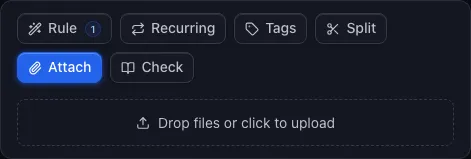
- Click the Attach button (paperclip icon) in the detail panel action toolbar
- Drag and drop a file onto the upload zone, or click to browse
- The file uploads and appears in the attachments list
Receipts save automatically — no need to click Save.
Viewing and Downloading
Section titled “Viewing and Downloading”In the attachments list below the upload zone:
- Click the filename to download the file
- Click the download icon to save a copy
Deleting a Receipt
Section titled “Deleting a Receipt”Click the trash icon next to any attachment to delete it. This cannot be undone.
Bulk Receipt Export
Section titled “Bulk Receipt Export”On the Transactions page, click Export in the toolbar, choose the Receipts scope, and export. This downloads a ZIP file containing all receipt attachments for the currently visible (or selected) transactions.
Receipt Indicator in Table
Section titled “Receipt Indicator in Table”Transactions with attachments show a paperclip icon in the table. If a transaction has multiple attachments, a count badge appears next to the icon.
Why Attach Receipts?
Section titled “Why Attach Receipts?”Keeping receipts inside Acclo IQ means the proof of a purchase lives next to the transaction it belongs to — no separate folder of photos to search through. This is useful for:
- Tax time — attach receipts to deductible expenses so everything is in one place at year-end
- Warranties and returns — keep the proof of purchase with the charge for big-ticket items
- Expense reporting — export a transaction’s attachments when you need to submit them
- Shared or reimbursable spending — document exactly what a charge was for
Frequently Asked Questions
Section titled “Frequently Asked Questions”What file types and sizes can I attach?
Section titled “What file types and sizes can I attach?”Images (.jpg, .jpeg, .png, .gif, .webp, .heic), and documents (.pdf, .docx, .xlsx), up to 10 MB per file. You can attach multiple files to a single transaction.
Are my receipts stored in the cloud?
Section titled “Are my receipts stored in the cloud?”No. Like the rest of your data, receipts are stored locally on your device. They’re included in full backups (opt-in, since they can be large) and, if you use Pro Cloud Sync, they sync end-to-end encrypted through your own cloud storage.
Do I need Pro for receipt attachments?
Section titled “Do I need Pro for receipt attachments?”Yes — receipt attachments are a Pro feature. CSV import, budgeting, and categorization are all available on the Free tier.
Next Step
Section titled “Next Step”Receipt attachments are part of Pro. See everything Pro unlocks:
Compare Free and ProRelated Guides
Section titled “Related Guides”- Transactions — manage transactions and their attachments
- Backup & Restore — receipts are included in full backups
- Licensing — receipts require a Pro license