Financial Intelligence ThatLives On Your Device
A personal finance app built on a simple idea: your financial data lives on your device and stays under your control. Open it and go — no Acclo IQ account to create. Import from any bank, categorize automatically, and understand your spending.
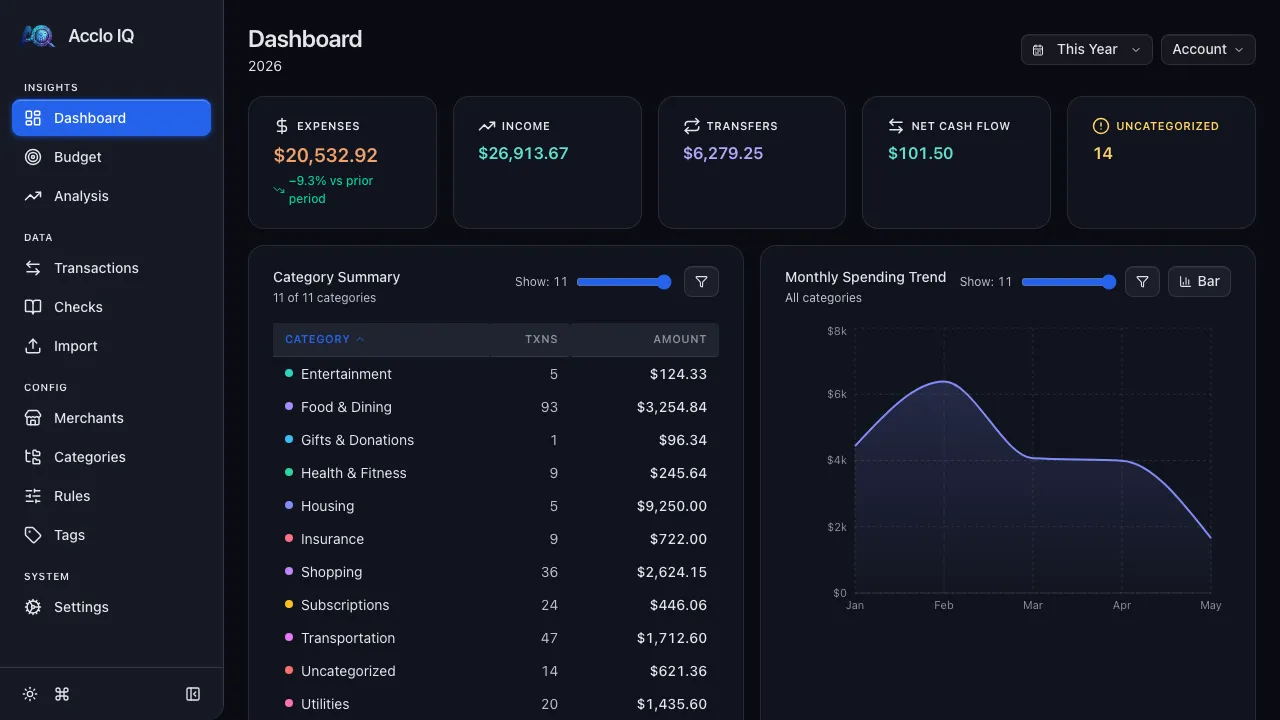
Everything You Need toTake Control
Powerful features that work together to give you complete visibility into your finances.
Auto-Categorization
A pattern-matching engine that categorizes every transaction automatically. Build rules once — they work forever.
Dashboard
Know exactly where your money goes — granular spending breakdowns, all on one screen.
Budgets
Set monthly targets by category. Track progress with trends and history — unplanned expenses are automatically flagged.
Recurring Detection
Automatically identifies subscriptions, bills, and recurring charges. See what's committed vs flexible in every budget category.
Spending Analysis
Find the patterns your bank app won't show you. Compare any month to the same month last year, track quarterly and annual trends — across your entire history.
Bank Sync
Stop downloading CSV files. Connect to thousands of banks and your transactions flow in automatically.
CSV Import
No bank-sync subscription? Drop in a CSV from any institution. Format profiles map columns; deduplication catches re-imports.
Tags
Cross-cut categories with flexible tags — track tax-deductible spending, business vs personal, anything you need to slice on later.
Check Register
Track paper checks the way other apps don't — record check numbers, mark cleared dates, reconcile with your bank statement.
Cloud Sync
Start on your laptop, pick up on your desktop. Seamlessly sync across devices using cloud storage you control, such as Google Drive.
Privacy by Architecture,
Not by Promise
We didn't just write a privacy policy. We built the architecture to match it: your financial records live on your device — you decide what, if anything, ever leaves.
Local-First
Your financial records live on your device. Analysis happens right there — and sharing them is always your call.
E2E Encrypted Sync
Cloud sync uses AES-256-GCM encryption with a password only you know. We cannot decrypt your data.
Telemetry You Control
Privacy-respecting, bucketed analytics that help us count users — not track them. No cookies, no fingerprints. One toggle to disable completely.
How It Works
From bank statement to complete financial picture in minutes.
Connect Your Bank
Link your bank or drag-and-drop a statement file.
Smart Categorization
A pattern-matching engine learns your merchants and categorizes every transaction automatically.
See the Full Picture
Recurring charges detected automatically. Budgets split into committed vs flexible. Spending trends and insights — all in one dashboard.
One App, Two Modes
The same core financial workflows on both — the desktop app stores a database file, protects credentials in your OS keychain, uses native system dialogs, and has a built-in updater; the browser version uses browser storage and dialogs and updates like any web app.
Desktop App
Native desktop app with local, on-device storage, OS-level credential protection, and native file dialogs. macOS, Windows, Linux.
- Data stored locally on your device
- OS keychain credentials
- Native file dialogs
PWA / Browser
Progressive web app — your data is stored locally in your browser, with AES-256-GCM encrypted credentials. Runs anywhere. Keep a backup, or add Cloud Sync (Pro), to protect your data and sync it across your devices.
- Data stored locally in your browser
- AES-256-GCM credential encryption
- No install required
Simple, Honest Pricing
Start free. Upgrade when you need more.
- Dashboard, budget & analysis
- Recurring detection (12-mo)
- Smart auto-categorization rules
- Up to 2 accounts, 5 tags
- Bank sync via SimpleFIN
- CSV import/export & backup
- Sample bank format profiles
- Everything in Free, plus:
- Unlimited accounts & tags
- Budget history & trends
- Unlimited recurring history
- Full analysis & YoY
- P&L Statements
- Unlimited bank sync accounts
- Cloud sync (E2E encrypted)
- Receipt attachments