
Feedback — Bug Reports & Feature Requests
Overview
Section titled “Overview”Acclo IQ includes an in-app feedback form for bug reports, feature requests, workflow notes, and other product questions.
Open it from Settings > About > Send Feedback.
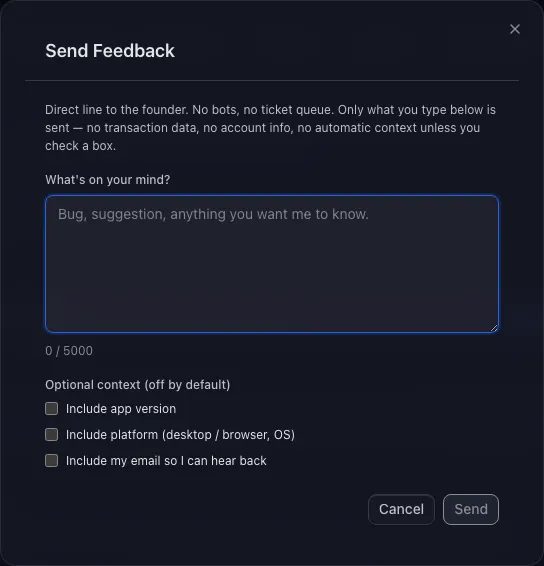
What Gets Sent
Section titled “What Gets Sent”Only the message you write is sent, unless you choose to include extra context below.
Optional context is off by default. You choose whether to include:
- App version — useful when a bug may be tied to a specific release
- Platform — desktop or browser, plus operating system
- Reply email — only needed if you want a response
The message field is capped at 5,000 characters. If you provide a reply email, it must be a valid email address.
Delivery
Section titled “Delivery”When you click Send:
- The app sends your message and any optional context you selected
- The feedback endpoint validates the request
- The message is delivered to the Acclo IQ support inbox
When To Use Feedback
Section titled “When To Use Feedback”Good fits:
- A bug you hit while using the app
- A feature request or workflow improvement
- Confusing wording or a rough edge in the interface
- Privacy, licensing, import, or sync questions
- Context you would rather not put in a public issue
Acclo IQ can’t reply unless you include an email. If you want a response, enable the email option and enter a valid address.
Privacy Notes
Section titled “Privacy Notes”- Your financial records stay out of the feedback message unless you choose to mention them
- App version, platform, and reply email are optional
- Feedback is handled as a support request, separate from product telemetry
- Email open tracking and click tracking are disabled
- Delivery and retention follow the support process described in the Privacy Policy
For retention and processor details, see the Privacy Policy and Privacy Architecture.
Related Guides
Section titled “Related Guides”- Settings — where the Send Feedback button lives
- Privacy Architecture — local-first data handling and telemetry controls